B-L-A-C-K-O-P


GrabberRaster [Download][BLOG]

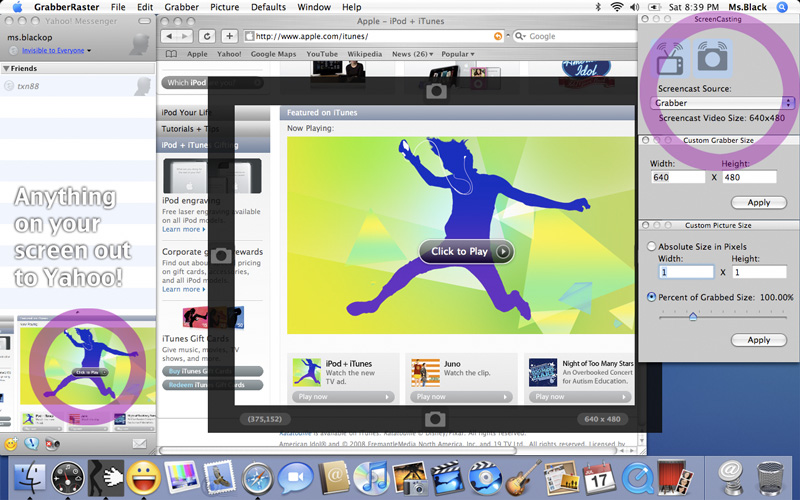
Free screen grabber now with dynamic screencasting: grab anything onscreen and use as a fake webcam. Desktop streaming, window grabs & more!

GrabberRaster allows you to take repeated screen grabs/captures from almost anything that appears on your Macintosh screen. Grab, resize, and save -- all in ONE CLICK. Use arrow keys for fine control over grab region. Save to JPEG, TIFF or PNG.


GrabberRaster Screen Capture

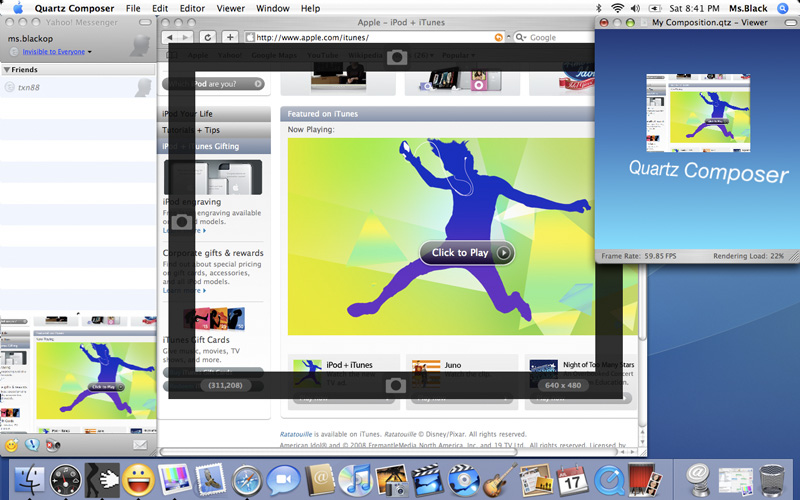
VJs will love the fact that GrabberRaster includes a CoreImage input plug-in, allowing you to grab any portion of the Mac screen and use it as input for Quartz Composer.


GrabberRaster with Quartz Composer


With the addition of a paid license GrabberRaster Screencast Edition allows you to grab portion of your Mac screen and loop it back as a virtual camera input.

Our EVERYTHING CAMERA BUNDLE includes GrabberRaster ScreenCast, FourEyes3D, VirtualEyez, CamCamX, DotMatrix, and Q@mera -- all for one low price ($99).


GrabberRaster Help

Grabbing Still Pictures with GrabberRaster:

1. Open GrabberRaster.
2. Click the Dots to resize the Grabber.
3. Click the border or use the arrow keys to move the Grabber.
4. See something you like, click Grab. You can also copy frames to the Pasteboard.
5. Default format is JPEG, but you can choose another.

NOTE: At this time, GrabberRaster works only with your primary display (where your Menubar lives)

ScreenCasting with GrabberRaster (requires licen$e):

1. Close Safari and other Camera apps.
2. Open GrabberRaster.
3. Under the Window menu, choose ScreenCasting.
4. Click the big TV button to turn screencasting on.
5. In the screencasting source, choose Grabber.
6. Open a camera application (use CamCamX demo if you need to test).
7. Open camera-enabled application or Safari (GrabberRaster camera can be accessed from all applications simultaneously).
8. Choose the GrabberRaster camera driver as the camera input.

Updates

GrabberRaster 1.600 (Released 2009.11.24) is the current version (with Snow Leopard fixes). GrabberWindow should probably not be used with Snow Leopard until we upgrade it. Check the version number of your copy under the Apple menu. You can find the latest download here.

Upgrade GrabberRaster (enables ScreenCasting)

To use GrabberRaster as a virtual camera input for screencasting, purchase a serial number now in our secure online store.


 B-L-A-C-K-O-P NEWS   
 SITE MAP   
 BLACKOP   
 PRESS   
 B-L-A-C-K-O-P HOME   
 DotMatrix   
 CamCamX   
 GrabberRaster   
 Q@mera   
 VirtualEyez   
 3D   
 Store   
 DOWNLOAD   
 COCOA NIBS   
 Tutorials   
 DIY Greenscreen   
 3D Webcam Mac   
 USB 3D webcam   
 BlackenedPixels   
 CatEye   
 CamCamX Blog   
 CatEye Blog   
 DotMatrix Blog   
 GrabberRaster Blog   
 Qamera Blog   
 Quicky   
 AsSceneOnTV   
 Watermarks   
 Watermarks Blog   
 PDF Watermarking Mac   
 PDFBatchBuild   
 PDF Combine Mac   
 CombinePDFs Mac   
 Combine PDF Files   
 Create iTunes Booklet   
 Share Your Pictures   
 Washington DC   
 Universal Binary   
 Cocoa Programming   
 Cocoa Software   
 Screen Capture   
 Screen Grab Mac   
 iSight download   
 iSight software   
 WebCam   
 PhotoBooth download   
 iPhoto   
 Photoshop   
 MacBook Camera   
 iMac Camera   
 CamCamX compatibility   
 Fake WebCam Mac   
 VJ Software Mac   
 Video Mixer Mac   
 Live Video Switcher   
 Apple Webcam Effects   
 Webcam Video Effects   
 Free iChat Video Effects   
 Skype Video Effects Mac   
 Video Effects Stickam   
 iSight Virtualizer Mac   
 Webcast Streaming Mac   
 Best Screencast Mac   
 Desktop Streaming Mac   
 Screencast Streaming Mac   
 Broadcast Live Streaming Video Mac   
 QuickTime Broadcaster   
 Quartz Composer   
 Quartz Composer Plugins   
 Quartz Composer Patches   
 Mogulus Video FX   
 Video Effects Ustream   
 Operator11 Video FX   
 Youtube Video Effects   
 Facebook Video Effects   
 Polaroid Camera Emulator   
 No recording device found   
 Photo Booth cannot open the camera   
 Free Download/Telechargez   
 Liberi Trasferimento   
 Libere la Transferencia   
 Disclaimer   
 Corporate   
 About   


Copyright © 2005-2009
All Rights Reserved
B-L-A-C-K-O-P