|
CamCamX 1.701 for Snow Leopard
CamCamX 1.701 is now available for downloading. Included in this release are important compatibility updates for Snow Leopard. In addition two new camera mix-modes are included. Side-by-side CNN style (using this mode will bring in the A-camera "still picture" image as the background. And also Picture-in-Picture, which allows you to run more traditional news stories. It's best to prep your artwork as 640x480 4:3 images for both performance and display. Also, if you have Flip4Mac or Perian installed, more types of video can be used as sources. Speaking of source video, check out keepvid.com - a site that allows you to download most youtube clips as .mp4. In general, MP4 clips are the best source format for CamCamX. We determined this experimentally by looking at the performance of various codecs. Sure, H.264 works great, but when you've got multiple cameras running and multiple webcam clients (Justin.tv and ustream.tv), it's more important to balance the CPU load by using traditional MP4.
By : Ms. Black CamCamX 1.701 for Snow Leopard

5-Camera Inputs Now Possible
We've been able to successfully configure a 1G Macbook (White) to work with 5 simultaneous camera inputs (Two USB cameras, two external Firewire iSight cameras and the Built-in iSight). 1. Get your free license to FourEyes3D (CamCamX users can email us). 2. Start FourEyes3D, use the [ 1 ] and [ 2 ] buttons as a 2 input switcher. 3. Enable Rebroadcasting in FourEyes3D. 4. Start Q@amera. Open the first Firewire iSight as the input. Enable Rebroadcasting. 5. Start CamCamX. 6. In CamCamX, select FourEyes3D as the A camera and use Camera B to switch between Q@mera and iSight #2.
By : Ms. Black 5-Camera Inputs Now Possible
The Hawk Show
By : Ms. Black The Hawk Show
Live Video Mix to Flash Webchat
Some Flash-based webcam applications are using the driver description string instead of the name of the camera in the camera selection popup. This can be confusing with CamCamX. The driver description for CamCamX is: USB Video Class VideoLabels: flash, live mix, webcam, webchat
By : Ms. Black Live Video Mix to Flash Webchat
CamCamX Live at The Permanent Record
http://web.mac.com/the.permanent.record/If you have a media event you are producing with our products, we are happy to send you linkage to promote it! Viva la media democracy!
By : Ms. Black CamCamX Live at The Permanent Record
CamCamX 1.604 - Performance Upgrade Notes
We released a new version of CamCamX this past week which should provide a substantial performance boost, reducing the frame delay between the source camera inputs and the mixed camera output which appears as a virtual camera input in other applications.
By : Ms. Black CamCamX 1.604 - Performance Upgrade Notes
How do I use CamCamX with iMovie HD?
1. Start CamCamX and make sure the Allow New Camera Connections button is enabled. 2. Open iMovie HD and create a new project in the iSight format. 3. In the iMovie HD window, move the toggle button Switch to import video or edit your movie to the left. 4. In iMovie, click the camera icon to the (left of the toggle), and from the pulldown and select Built-in iSight (CamCamX). 5. Click the Record with iSight button. Labels: faq
By : Ms. Black How do I use CamCamX with iMovie HD?
CamCamX 1.601 Released - Mix Output to Secondary Display
Today we released a new version of CamCamX which includes the ability to mix to a secondary display. Most Mac models (including MacBook) have a secondary display connector. Apple makes a variety of secondary display adapters, allowing you to run CamCamX mixes out to a secondary device. Run the CamCamX mixer on your main display and connect the secondary display to: 1. Composite and S-Video. 2. VGA and S-VGA Projectors. 3. Apple Cinema Display (DVI). 3. Plasma Television (HDMI). It works pretty good. Labels: faq
By : Ms. Black CamCamX 1.601 Released - Mix Output to Secondary Display
Switching Built-in iSight to Camera B
If you have only one camera (i.e. Built-in iSight) and want to make it appear under Camera B instead of A. 1. Under the A Menu, choose No Camera. 2. Under the B Menu, choose No Camera -- forces refresh of available cameras. 3. Under the B Menu, choose Built-in iSight. Labels: faq
By : Ms. Black Switching Built-in iSight to Camera B
iStopMotion - Create Stop Motion Movies
Boinx Software has a product called iStopMotion that will allow you to create stop motion animations using CamCamX as a camera input. Check it out: http://boinx.com/istopmotion/ If you have QuickTime Pro, you can also create stop motion in DotMatrix or Q@mera. Labels: stop motion animation
By : Ms. Black iStopMotion - Create Stop Motion Movies
Webcam Uploader
If you need one of those old-school style webcam programs that can FTP images up to a web server, try Simple Webcam. It works with CamCamX.
By : Ms. Black Webcam Uploader
GrabberRaster for Screencasts
Just wanted everyone to know that we added a virtual camera driver to GrabberRaster so you can include portions of your Mac screen in your CamCamX live mixes. Use for screencasting, or grab the remote video feed from your iChat session and use it in your live mix.
By : Ms. Black GrabberRaster for Screencasts
CamCamX 1.512 Now Available
Every once in awhile we were seeing problems on MacBooks (Intel graphics adapter) where having CamCamX running in the background would cause some strange behaviour in the foreground application. We think we've isolated this problem to the QuickTime 2vuy to ARGB converter that we were using to drive the MixMonitor window. We've changed things around to use OpenGL for that window, and are being a bit less aggressive when it comes to performance. If you experience any strange problems with display updates when CamCamX is running (1.512 going forward), please be sure to ping us with a quick bug report that includes your 1. OSX Version, 2. Mac Model# and 3. Graphics Card make and model.
By : Ms. Black CamCamX 1.512 Now Available
CamCamX Fully Integrated with Leopard iChat Theater
Today we released a new version of CamCamX, 1.511, which includes full support for Leopard. The enabling technology is our innovative Quartz Composer plug-in, which allows the CamCamX output to appear as an image input in any Quartz Composer composition. With this we built plug-ins for Leopard PhotoBooth which allow you to do sophisticated "Picture in Picture" style video mixing directly into Photo Booth, which means you can easily (and cheaply) record live video mixes. For iChat Theater, we've included a file in the Goodies folder which will allow you to "share" the CamCamX mix output with anyone you're chatting with on iChat Video. Simply go to the file menu and Choose "Share a File with iChat Theater", and select the CamCamX sharing .QTZ -- this will send the live mix output from CamCamX to your chat buddy. Keep in mind that both DotMatrix and Qamera also support this functionality - or - you can mix DotMatrix and Qamera output with CamCamX and go nuts with a creative performance over chat. Because all these features are built on our sophisticated camera sharing architecture, it means that you can perform live on video, and simulcast the video stream AT THE SAME TIME, to SKYPE, Yahoo!Messenger, iChat, and almost all web-enabled chats, including Stickam, ustream.tv and mogulus. We've also made improvements in the underlying architecture to support "Fast User Switching". Since Leopard allows two users to be logged in, both with the camera open, we thought it would be good if CamCamX could also be run independently in each session.
By : Ms. Black CamCamX Fully Integrated with Leopard iChat Theater
DotMatrix 1.503 now works as CamCamX Input
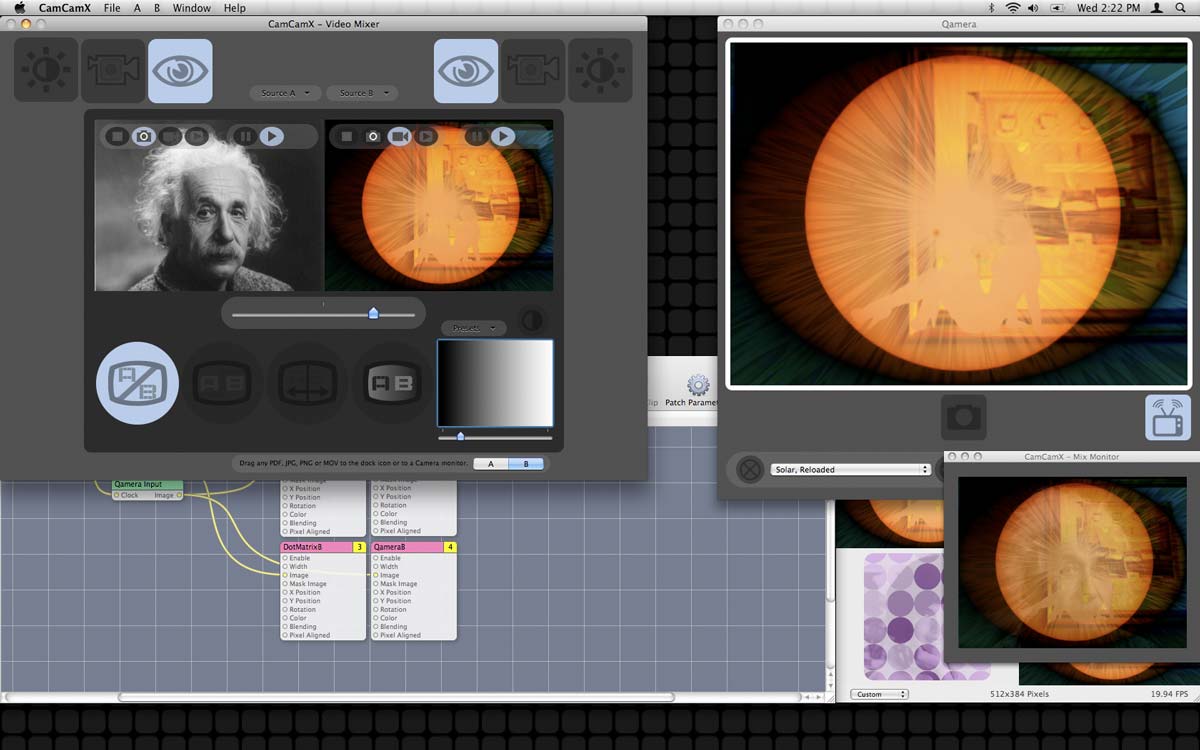
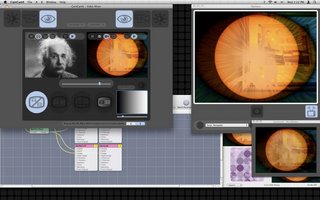 Back when trying to juggle our release schedule, and before CamCamX could read the ARGB camera inputs sent by Qamera and DotMatrix, we put a little code into the DotMatrix camera rebroadcaster to keep CamCamX from loading it. Well, today, in conjunction with our cool new Quartz Composer plug-ins for DotMatrix and Qamera, we've removed this limitation so that you can now setup Qamera and DotMatrix as inputs in CamCamX and mix them live. In the picture on the right you can see the combo of CamCamX, DotMatrix and Qamera in action on Leopard. Naturally, we test our products on Tiger and Leopard and PowerPC and Intel. As it is to be expected, bugs may escape our awareness from time to time and we sure appreciate it when people tell us about it. It helps us make the products better.
By : Ms. Black DotMatrix 1.503 now works as CamCamX Input
CamCamX and QuickTime 7.3
NOTE: The following applies only to QuickTime 7.3 under Tiger.It's been something of a challenge tracking the rapid deployment of all the QuickTime revisions, ahem, to say the least. While our Apps are working great under both QuickTime 7.2 and 7.3 (and probably 6.5, although we don't test it), they have made some changes to QT Player Pro that will require an update to all our little virtual cam apps for recording. We definitely want to do this, as the camera output from DotMatrix and Qamera is ARGB with an alpha channel which is something that many VJ's and PRO video nerds will love. If that sounds like you, either use an alternative movie recording App, or downgrade to QuickTime 7.2 -- QT 7.2, which we used primarily during the development of our new ARGB camera technology, works great with both Qamera and DotMatrix - you can record a Device Native 640x480 with an alpha channel and bring it into Final Cut. Etc. Or pipe DotMatrix into Quartz Composer and have the video texture alpha ready (at least, that's the theory). BTW, we did release a CamCamX upgrade today that fixed a problem preventing MACAM and other third party webcams, including Qamera from working correctly. Now, on Tiger, you have a choice of either starting CamCamX first, then Qamera, or vice versa. On Leopard, with our X5 driver installed ("Leopard-Only.pkg"), it doesn't make a difference. If you have any questions about routing video signals, please send them our way. Labels: tiger
By : Ms. Black CamCamX and QuickTime 7.3
CamCamX, Leopard, Quartz Composer
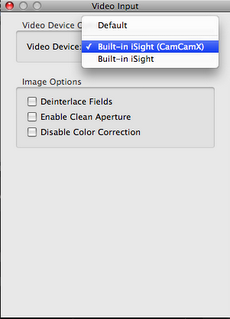 Due to the fact that new Quartz Composer accesses the iSight using the shared iSight features of Leopard, using CamCamX with QuartzComposer requires an additional step (shown at right). Basically, you need to locate the video input "patch" inside the .QTZ composition, and then select the CamCamX camera as the source input. We're trying out some new QC Leopard stuff and it works great. Labels: camcamx, leopard, quartz composer
By : Ms. Black CamCamX, Leopard, Quartz Composer
Leopard Support Driver
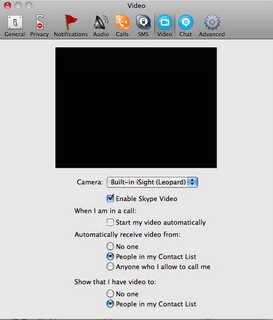 Today we released a new mini-driver for Leopard that allows DotMatrix and CamCamX to open the Built-in iSight in Leopard's new "Shared Mode". This will allow both CamCamX and DotMatrix to run at the same time as PhotoBooth. We call this little driver CamCamX5 and it is available as free download. This driver will also allow Yahoo! Messenger, Skype and iMovie HD (all applications which support CamCamX) to open the iSight in shared mode under Leopard. Labels: imovie, isight, leopard, skype, yim
By : Ms. Black Leopard Support Driver
|